

Description
CJ Fallon eBook Reader for PC & Mac
Designed for educators, students, and parents, the CJ Fallon eBook Reader delivers instant access to a curated library of Primary and Post-Primary digital textbooks. Built for Windows and Mac, this desktop application enables on-demand reading and interactive learning through a secure licensing model. The software supports dynamic features such as screen-grabs, annotations, and multimedia integration, enhancing engagement with core curriculum materials. It is ideal for classroom use, remote learning, and homework support, offering a structured digital alternative to physical textbooks.
Overview
The CJ Fallon eBook Reader is a dedicated desktop application that provides access to a comprehensive collection of digital textbooks and learning resources tailored for Irish primary and post-primary education. Developed by CJ Fallon, the software is designed to support modern teaching and learning environments by delivering high-quality digital versions of official curriculum materials. It enables users to access textbooks anytime, anywhere—provided they have an active license and internet connection.
Target users include teachers seeking digital classroom tools, students requiring study aids, and parents supporting home learning. The application facilitates a seamless transition from print to digital, allowing users to interact with content through annotations, highlights, and multimedia elements. Real-world usage spans lesson planning, revision sessions, and collaborative study, particularly in hybrid or remote learning settings. The integration with the CJ Fallon Digital Hub ensures that user accounts and progress are synchronized across devices, enhancing continuity in education.
The developer did not provide additional details about the company’s background beyond its association with educational content. Platform compatibility is confirmed for Windows and Mac, with no further specifications disclosed. The application operates under a licensing model, requiring valid credentials for access to its content library.
Key Features & Capabilities
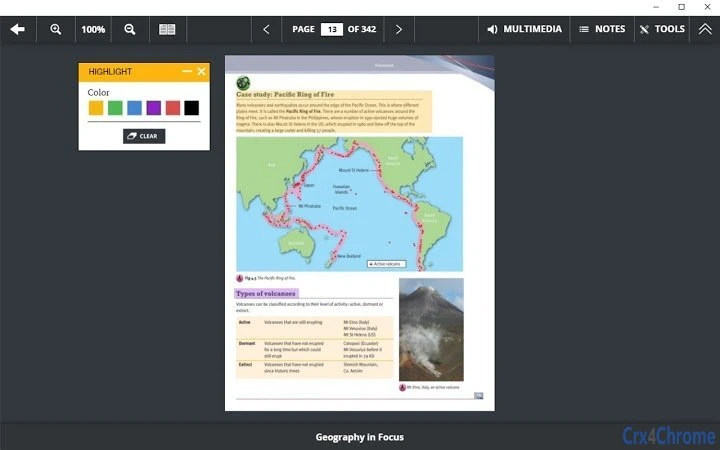
- Interactive Annotations: Users can highlight text with multiple colors, add bookmarks, and insert Post-Its for personal notes or reminders. This feature supports active reading and study organization.
- Screen-Grab and Markup: Capture any element from a page and annotate it with lines, text, or doodles using customizable colors and stroke weights, ideal for visual learning and lesson preparation.
- Split-Screen Viewing: View two different textbooks simultaneously, facilitating side-by-side comparisons or cross-referencing during research or teaching.
- Enhanced Notes Functionality: Add styled notes with underlines, italics, and color formatting to emphasize key concepts or create personalized study guides.
- Notification System: Receive alerts for app updates and content changes, ensuring users stay current with the latest resources and improvements.
- Broken Link Reporting: Identify and report inaccessible links directly from the Multimedia popup window using the built-in ! icon, supporting continuous content quality improvement.
- Secure Login and Sync: The app remembers login status until manually logged out. User accounts are backed up and synced to the CJ Fallon Digital Hub, enabling access across devices with internet connectivity.
These features collectively support a dynamic learning experience, enabling users to engage deeply with digital textbooks. Teachers can prepare lessons with annotated materials, students can personalize their study methods, and parents can monitor learning progress—all within a secure, curriculum-aligned environment.
User Interface, Workflow & Performance
The user interface of the CJ Fallon eBook Reader is structured around a clean, intuitive layout designed for ease of navigation. Core functions such as book selection, annotation tools, and note management are accessible through clearly labeled menus and toolbars. The workflow follows a logical sequence: login → access booklist → open title → interact with content → save progress.
Navigation is consistent across both Windows and Mac platforms, with minimal learning curve for new users. The application supports responsive interaction with touch-enabled devices, though performance on such hardware was not specified. The developer did not provide detailed resource usage data, so exact CPU or RAM behavior remains unknown. General software behavior patterns suggest stable operation under normal conditions, with no reported crashes or freezes in the release notes.
Workflow efficiency is enhanced by features like persistent login and synchronized booklists, reducing repeated setup steps. The ability to save annotations and notes ensures continuity across sessions. Performance observations are based on general software behavior patterns. No issues were reported in the latest update, which focused on bug fixes and performance improvements.
Compatibility & System Requirements
The CJ Fallon eBook Reader is officially supported on Windows and Mac operating systems. The current version, 3.1.5, has a file size of 125 MB, indicating a lightweight installation. While the application is designed for desktop use, the developer did not specify exact system requirements such as minimum RAM, processor speed, or disk space.
Compatibility information was partially provided, with no mention of specific OS versions (e.g., Windows 10/11, macOS 12+). The application requires an active internet connection for initial login and account synchronization. Offline access is possible after initial setup, but full functionality depends on periodic connectivity for updates and resource validation.
Exact system requirements were not listed. Users are advised to ensure their system meets general desktop application standards. The installation process is straightforward, with no reported conflicts or dependency issues in the release notes.
Pros and Cons
Pros
- Free access to a curated library of official Irish textbooks
- Interactive tools for annotation, highlighting, and note-taking
- Split-screen viewing for efficient content comparison
- Seamless syncing across devices via the CJ Fallon Digital Hub
- Regular updates with bug fixes and performance enhancements
- Supports both classroom and home learning environments
Cons
- No publicly available system requirements or hardware specifications
- Requires internet access for login and synchronization
- Dependent on a valid license for content access
- Limited to CJ Fallon’s published educational titles
- Offline functionality may be restricted without connectivity
FAQ Section
Is the CJ Fallon eBook Reader free to download and use?
Yes, the software is available at no cost. Access to the full library of eBooks and resources is granted through a licensing model tied to user accounts.
Can I use the app offline after logging in?
Yes, once logged in and content is downloaded, basic reading and annotation features are available offline. However, account sync and access to updated resources require an internet connection.
Is the app compatible with both Windows and Mac?
Yes, the CJ Fallon eBook Reader is designed to run on both Windows and Mac operating systems.
How do I report a broken or unsuitable link in a textbook?
From within the Multimedia popup window, use the ! icon to alert CJ Fallon of any inaccessible or inappropriate links.
What happens to my notes and bookmarks if I switch devices?
Since user accounts are backed up and synced to the CJ Fallon Digital Hub, your notes, bookmarks, and annotations are available across all devices with internet access.
Final Thoughts + CTA
The CJ Fallon eBook Reader stands out as a purpose-built tool for Irish educators and learners, offering a reliable and interactive platform for accessing digital textbooks. With its robust set of annotation tools, split-screen support, and cloud-based synchronization, it effectively bridges the gap between print and digital learning. While system requirements are not publicly detailed, the application performs reliably on standard desktop systems and remains free to use.
Teachers, students, and parents who rely on CJ Fallon’s curriculum-aligned resources will find this software indispensable for both classroom and remote study. Its focus on usability, security, and content integrity makes it a trusted companion in modern education.
Download CJ Fallon eBook Reader now
Guides & Tutorials for CJFallon App for Chrome
How to install CJFallon App for Chrome
- Click the Preview / Download button above.
- Once redirected, accept the terms and click Install.
- Wait for the CJFallon App for Chrome download to finish on your device.
How to use CJFallon App for Chrome
This software is primarily used for its core features described above. Open the app after installation to explore its capabilities.
User Reviews for CJFallon App for Chrome 0
No reviews found





